We built and launched Intelli’s landing page expecting instant traction and ranking first on google searches because we used NextJs ; Duh— and got crickets. No Google love, organic clicks were there but mostly redirecting from socials; from here(thanks to the people who read my articles/stories), but when it came to Google Organic search the story was different. It was bewildering. We had built an AI powered multi-channel customer engagement and support platform (with all the bells and whistles), yet searchers couldn’t find us. For a couple of reasons I will list here in the preamble.
1. the Intelli domain we wanted and was available was way too expensive a spend for us at this stage (given our priorities) so we went for an affordable one www.intelliconcierge.com long but kind of aligns with what we were doing when we started out (Travel CS)
2. We had other players in the market who came before us. Hello Jetbrains with IntelliJ IDEA… You have shadowed us for far too long. So we asked ourselves a lot of questions on how to improve our SEO.
Why wasn’t anyone finding us first? Why won’t we show up on Google’s First Page? Why won’t our page rank in the first 5 searches? If these are questions you have asked yourself and either didn’t find the asnwers or did but were not satisfied; this article is for you. Many founders skip SEO in the excitement of launch, then wonder why “Publish” didn’t spark a traffic fireworks show. We learned the hard way that SEO isn’t magic, but it is make-or-break for being found first on the internet.
In this post I’ll walk you through exactly what we did — step by step — to fix our SEO from the ground up. Whether you’re on Next.js, plain HTML, WordPress or anything in between, these tweaks apply. We overhauled our metadata and headings, sharpened keyword usage, clarified our site name, added structured data, and set up sitemaps/robots.txt. Best of all, none of it required hiring an SEO guru — just some elbow grease and free tools.
The SEO Reality Check
First, we confessed we had an SEO problem. Searching for our site using the keywords “Intelli” were very humbling. We were on the 2nd or 3rd page; Only our LinkedIn page showed up on the first page and this is because of two reasons; we post often and LinkedIn is crawled often for google searches. Logging into Google Search Console was very telling: it showed very negligible impressions for our main keywords, and the few clicks we had were from direct links shared or from social media. Some were purely accidental. As Google puts it, GSC shows “which queries bring users to your site. Analyze your site’s impressions, clicks, and position on Google Search”. In our case, the answer was “second to none,” because very few individuals knew we existed; according to our search. We had to improve this.
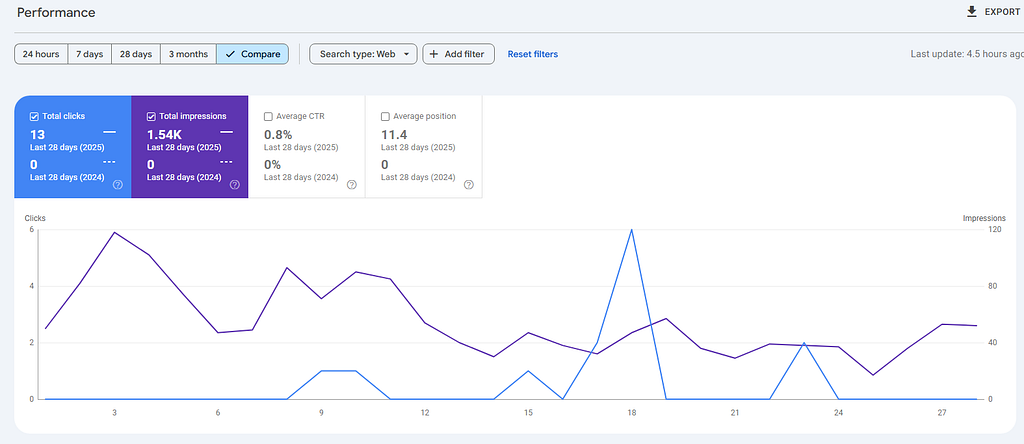
Next, we audited why. We realized our site was missing all the basic signposts that Google needs. Our <title> tags were generic, we had no or duplicate headings, and we hadn’t told Google about our pages (no sitemap!). In short, we’d built a gorgeous site but never optimized it for search engines. So we set out on an SEO makeover.
Here’s what we changed, and how you can do it on any stack:
Metadata Makeover: Title Tags & Meta Descriptions
Your <title> tag and meta description are like the book cover and blurb for Google. We fixed ours by making titles descriptive, keyword-rich, and brand-inclusive. For example, we changed our home page title from
<title>Intelli</title>
(We changed this from  Intelliconcierge because we wanted to rank for Intelli)
to something more like:
<title>Intelli – Engage and support customers </title>
"Add a short snippet of what your platform does."
This new title includes our main keywords (“Engage and support Customers ”, “Intelli”) and our brand. We kept it under ~60 characters to avoid truncation. (Pro tip: Google typically shows about 65–70 characters or ~580–600px of a title.)
We also rewrote our meta description to be a concise, inviting summary of the page with a call to action, around 150–160 characters. For example: “Intelli helps businesses automate customer service using AI. Sign up now for improved customer support!” Google usually shows up to ~960px of meta description on desktop, so roughly 150–160 chars. We used a SERP snippet preview tool to test these lengths.
These changes alone turned our search snippet from vague to clickable. A clear, keyword-rich title catches attention, and a helpful description boosts click-through rate (CTR). Remember, Google uses your meta tags to generate the search snippet. Keep each page’s title and description unique and avoid stuffing in too many keywords. Instead, sprinkle in one or two main terms naturally.
Golden Nuggets:
- Title tag: Include primary keyword + brand, keep around 50–60 characters.
- Meta description: Write a helpful summary with at least one keyword, ~150–160 characters.
- One <h1> per page: Make it match your title theme (more on headings below).
- Alt text: Don’t forget image alt attributes – a few words describing each image helps image search.
Content & Structure: Headings and Keywords
Once our metadata was in order, we turned to page content. Search engines love well-structured pages. We audited our content and headings like nit-picks: making sure we had one <h1> as the page title, then logical <h2>–<h3> sections. We updated our homepage to have an H1 that mirrors the title tag (e.g. “Intelli — Engage and Support Customers”), so Google sees a consistent topic. Each section under that got meaningful subheadings.
Next, we sharpened our keyword usage. We researched the terms people actually search. Tools like Google Trends, Keyword Planner, and even the “Performance” report in Search Console helped. We asked, “What would someone type if they needed a platform for AI support to engage with their customers and warm leads?” Likely queries included “AI multi-channel software,” “automated customer support,” or “Engage customers” “Marketing to customers”. We made sure these phrases appeared naturally in our content, especially in the first paragraph and headings. We didn’t cram keywords unnaturally — Google frowns on that — but used them in context. For example: “Intelli is an AI-powered customer support multi-channel platform that helps businesses engage customers and leads.”
If you have multiple pages, avoid competing with yourself on the same keywords (this is called “cannibalization”). Check Search Console to see if two pages vie for a single term, then merge or distinguish them.
We also took stock of our content’s readability. Short paragraphs, bullet points, and clear language not only help readers but help SEO. Google’s algorithms notice when users engage longer with the content.
- We added a couple of bullet lists (like this one!) to break up text. For example, we listed Intelli’s key features in bullets, which made it easier for users and gave Google clear signals of what’s important on the page.
- A clear way for your business might be answering a question they have in a straightforward way for example; How much does [insert company name here] charge per month? — We charge [insert amount you charge] in USD or whatever currency. Google picks up such responses faster and improves your ranking on Google search.
Structured Data: Speaking Google’s Language
To make our site even more search-engine-friendly, we added structured data (schema). This is just a fancy way of saying we gave Google explicit hints about our content using JSON-LD code. On our homepage we implemented the “Organization” schema for Intelli Concierge: name, logo, social profiles, and so on. We also added a BreadcrumbList schema so Google could understand our navigation. These snippets help generate rich results (like knowledge panels or site links).
Google Search Central encourages adding as many relevant properties as apply; they say some fields help “disambiguate your organization” and even influence which logo shows in search results. In practice, that means including our company name, URL, logo URL, and contact info in the JSON-LD script. We pasted something like:
<script type="application/ld+json">{
  "@context": "https://schema.org",
  "@type": "Organization",
  "name": "Intelli",
  "url": "https://www.intelliconcierge.com",
  "logo": "https://www.intelliconcierge.com/logo.png",
  "sameAs": [
     "https://twitter.com/intelli",
     "https://linkedin.com/company/intelli-concierge"
  ]
}</script>
Even though structured data doesn’t directly boost rankings, Google’s docs show that pages with schema saw up to 25–82% higher click-through rates in case studies. In short: we made our site understandable, and Google rewarded us with better search features.
Our Structured Data Tips:
- Use a JSON-LD schema generator or CMS plugin to add schema (if you’re on WordPress, plugins like Yoast can help).
- On static/Next.js sites, paste a <script type="application/ld+json"> block in your HTML template.
- Include Organization schema on your homepage (name, logo, social, etc.).
- If you have articles, add Article schema (title, author, date). If you list products or services, add Product or Service schema.
- You can test with Rich Results Test and fix any flagged issues.
Sitemap & Robots.txt: Guiding the Crawlers
Next, we made sure Google could crawl our site properly. We generated an XML sitemap listing all our important pages (You can use ChatGPT and a ton of other free tools online, or plugins if you use a CMS). Then we submitted that sitemap URL in Google Search Console, under Index > Sitemaps. We also added a line in our robots.txt file pointing to the sitemap (e.g. Sitemap: https://www.intelliconcierge.com/sitemap.ts) for your case it will be sitemap.xml if you are not using NextJs; so crawlers can find it automatically.
Why bother? Google explicitly recommends sitemaps: “A sitemap helps search engines discover URLs on your site… in most cases, your site will benefit from having a sitemap”. It doesn’t guarantee crawling, but it gives the crawler a roadmap. After submitting ours, Search Console started showing index coverage data, telling us how many pages were indexed or if any were blocked.
Speaking of blocking: we audited robots.txt carefully. We only disallowed obviously private or redundant paths (for example, /api/* endpoints or temporary calendar links). We didn’t block any of our main pages. Remember, Google’s guide warns that robots.txt is mainly to manage crawler traffic, not to hide content. In fact, if you block a page in robots.txt, Google might index it without reading content! So use noindex meta tags on pages you want hidden, not robots.txt (which should almost always allow your public pages). In our case, we ensured the robots.txt looked like:
User-agent: *
Allow: /
Disallow: /api/
Disallow: /private/
Sitemap: https://www.intelliconcierge.com/sitemap.xml
This way, crawlers could easily access everything we wanted them to see.
Keeping Tabs: Tools & Testing
Throughout this process we leaned heavily on tools — mostly free — to track progress. Google Search Console was our north star: every week we checked the Performance report for impressions and clicks by query and page. GSC truly “helps measure your site’s search traffic and performance… fix issues, and make your site shine in Google Search results”. When our changes took effect, we started seeing impressions rise for our target keywords, and our average position improved.
We also used:
- Google Analytics: to verify that organic search visits started ticking up and check bounce rates.
- Keyword research tools: Google’s own Keyword Planner (free with a Google Ads account) and Google Trends helped confirm that we were using terms people actually search for.
- PageSpeed & Core Web Vitals: Since load speed is now a Google ranking factor, we ran Lighthouse audits and the Web Vitals report in Search Console. Google recommends monitoring Core Web Vitals (LCP, FID, CLS) on mobile and desktop. We optimized images and enabled caching to get green scores.
- Another tool I had almost forgotten to add was Ahrefs; I discovered this for backlinks and search ranking was overall most accurate.
Quick tool tips:
- In Search Console Performance, filter by page or query to see if your tweaks are working (new clicks = good!).
- Use the URL Inspection tool in Search Console to “Request Indexing” when you publish or update a page. It’s a quick way to tell Google to re-crawl that page.
- Try Screaming Frog (free version) or a similar crawler to audit on-page SEO (it will show missing titles, broken links, duplicate content, etc.).
- If you want ranked insights, tools like Ahrefs or SEMrush offer free trials and can spy on competitors’ top keywords. But you don’t absolutely need them — start with Google’s free reports.
Results & Lessons Learned
After implementing all these changes, our SEO performance turned a corner. Within a month we saw the first glimmers of traffic: impressions went from near-zero to hundreds per day, and clicks began appearing for our target phrases. It’s hard to quantify exactly how much each change helped, but the combo of better titles, headings, and schema definitely improved our visibility. More importantly, our click-through rate (CTR) jumped because our search listings finally looked relevant and trustworthy. What was once a sad “0” in Search Console started to climb.
The key lesson? SEO is a long game of fundamentals. You won’t rocket to page one overnight, but you will rank higher (and attract real users) once you do the basic housekeeping. Every site — no matter the tech stack — should have well-crafted metadata, logical headings, a clear site structure, and a sitemap. Structured data and robots.txt are icing on the cake. These steps are mostly free and under your control; it just takes time and attention to detail.
If you feel overwhelmed, pick one thing and do it: start with the title and description on your homepage. Then audit Search Console for obvious issues (errors or excluded pages). Step by step, you’ll build momentum. SEO isn’t some mystical secret — it’s about making your site understandable and appealing, both to Google and to human visitors.
As I wrap up to get out of here.(TLDR)
Ensure to remember these:
- Optimize Metadata: Catchy title + meta desc with keywords (watch character limits).
- Structure Content: One <h1> per page, strategic <h2>s, and naturally include your main keywords.
- Add Schema: Use JSON-LD for Organization, Articles, Products, etc., to enable rich results.
- Sitemap & Robots: Submit an XML sitemap (Google loves it) and make sure robots.txt isn’t blocking anything important.
- Monitor & Iterate: Use Google Search Console religiously to track queries, clicks, and fix any issues that crop up.
By doing this, you’ll move from obscurity to being visible. And being visible means more potential customers discovering you daily.
If you’d like to see these principles in action, check out Intelli — our own AI customer support platform. We believe in practicing what we preach (yes, we walk the talk !), so we apply these SEO tactics to our product site too. Give it a browse and see if our improved search listing stands out.
Ready to give your site an SEO tune-up? Start with your homepage metadata and a quick run through Search Console. Then pick one more area (headings, content, or schema) and fix it. Before long, Google will start rewarding your efforts. And who knows — maybe your site will be the next case study inspiring other founders/startups especially your competitors with big budgets to spend.
References: We followed Google’s official guidance and SEO best practices throughout this process. These changes are grounded in what’s proven to work in 2025 and beyond. Have a wonderful day and may your star shine brighter as you are noticed by the world, and may your search rankings soar! Adios